Pages

Showing posts with label Design Patterns. Show all posts

Wednesday, September 9, 2009

Singleton Pattern

Source:- C-sharpcorner

Link:-

http://www.c-sharpcorner.com/UploadFile/questpond/DP109212008014904AM/DP1.aspx

There are situations in a project where we want only one instance of the object to be created and shared between the clients. No client can create an instance of the object from outside. There is only one instance of the class which is shared across the clients. Below are the steps to make a singleton pattern :-

  1. Define the constructor as private.
  2. Define the instances and methods as static.

Below is a code snippet of a singleton in C#. We have defined the constructor as private, defined all the instance and methods using the static keyword as shown in the below code snippet figure 'Singleton in action'. The static keyword ensures that you only one instance of the object is created and you can all the methods of the class with out creating the object. As we have made the constructor private, we need to call the class directly.
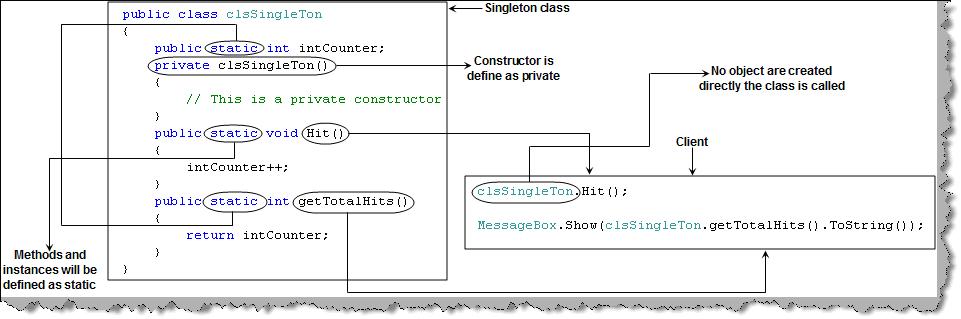
Figure 24. Singleton in action
Note : In JAVA to create singleton classes we use the STATIC keyword , so its same as in C#. You can get a sample C# code for singleton in the 'singleton' folder.

When you are using singleton pattern becareful about the threading, there might be some cases two threads may try to use the same object in that case application will end up having wired results.

Use the following code

object cacheLocker = new object();

lock (cacheLocker)
           {
           // Actual thread safe code   

           }

Are you can use Monitor class as well

 private readonly System.Threading.ReaderWriterLockSlim LockObj = new System.Threading.ReaderWriterLockSlim();

        public void Add(T item)
        {
            this.LockObj.EnterWriteLock();
            try
            {
                if(this.InternalCache.Count == 10)
                    this.InternalCache.RemoveLast();

                this.InternalCache.AddFirst(item);
            }
            finally
            {
                this.LockObj.ExitWriteLock();
            }
        }
Prototype Pattern

Source :-C-sharpcorner

link:-

http://www.c-sharpcorner.com/UploadFile/questpond/DP109212008014904AM/DP1.aspx

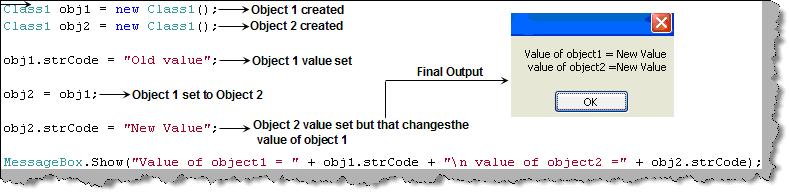
Prototype pattern falls in the section of creational pattern. It gives us a way to create new objects from the existing instance of the object. In one sentence we clone the existing object with its data. By cloning any changes to the cloned object does not affect the original object value. If you are thinking by just setting objects we can get a clone then you have mistaken it. By setting one object to other object we set the reference of object BYREF. So changing the new object also changed the original object. To understand the BYREF fundamental more clearly consider the figure 'BYREF' below. Following is the sequence of the below code:

  • In the first step we have created the first object i.e. obj1 from class1.
  • In the second step we have created the second object i.e. obj2 from class1.
  • In the third step we set the values of the old object i.e. obj1 to 'old value'.
  • In the fourth step we set the obj1 to obj2.
  • In the fifth step we change the obj2 value.
  • Now we display both the values and we have found that both the objects have the new value.


Figure 21. BYREf
The conclusion of the above example is that objects when set to other objects are set BYREF. So changing new object values also changes the old object value.
There are many instances when we want the new copy object changes should not affect the old object. The answer to this is prototype patterns.
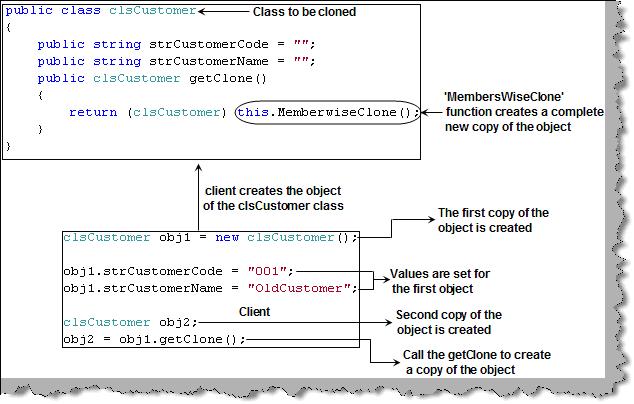
Lets look how we can achieve the same using C#. In the below figure 'Prototype in action' we have the customer class 'ClsCustomer' which needs to be cloned. This can be achieved in C# my using the 'MemberWiseClone' method. In JAVA we have the 'Clone' method to achieve the same. In the same code we have also shown the client code. We have created two objects of the customer class 'obj1' and 'obj2'. Any changes to 'obj2' will not affect 'obj1' as it's a complete cloned copy.

Figure 22. Prototype in action
Note : You can get the above sample in the CD in 'Prototype' folder. In C# we use the 'MemberWiseClone' function while in JAVA we have the 'Clone' function to achieve the same.


(A) Can you explain shallow copy and deep copy in prototype patterns ?

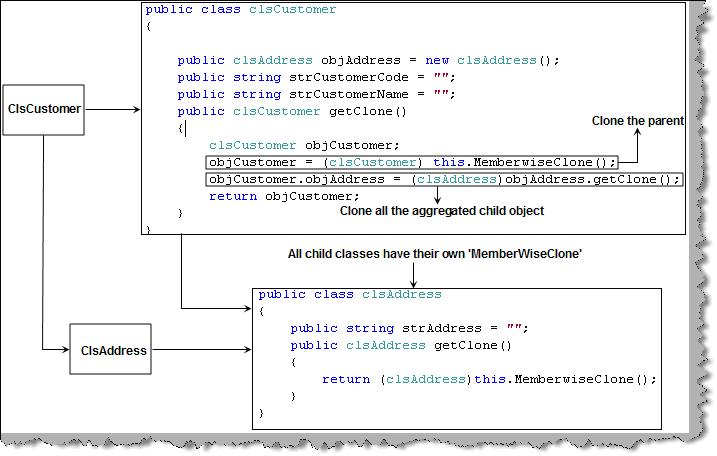
There are two types of cloning for prototype patterns. One is the shallow cloning which you have just read in the first question. In shallow copy only that object is cloned, any objects containing in that object is not cloned. For instance consider the figure 'Deep cloning in action' we have a customer class and we have an address class aggregated inside the customer class. 'MemberWiseClone' will only clone the customer class 'ClsCustomer' but not the 'ClsAddress' class. So we added the 'MemberWiseClone' function in the address class also. Now when we call the 'getClone' function we call the parent cloning function and also the child cloning function, which leads to cloning of the complete object. When the parent objects are cloned with their containing objects it's called as deep cloning and when only the parent is clones its termed as shallow cloning.

Figure 23. Deep cloning in action

Sunday, September 6, 2009

Builder Pattern

Source:- C-sharpcorner

Link:-

http://www.c-sharpcorner.com/UploadFile/questpond/DP109212008014904AM/DP1.aspx

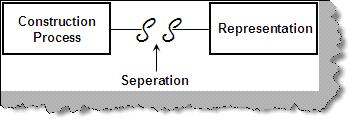
Builder falls under the type of creational pattern category. Builder pattern helps us to separate the construction of a complex object from its representation so that the same construction process can create different representations. Builder pattern is useful when the construction of the object is very complex. The main objective is to separate the construction of objects and their representations. If we are able to separate the construction and representation, we can then get many representations from the same construction.

Figure 11. Builder concept
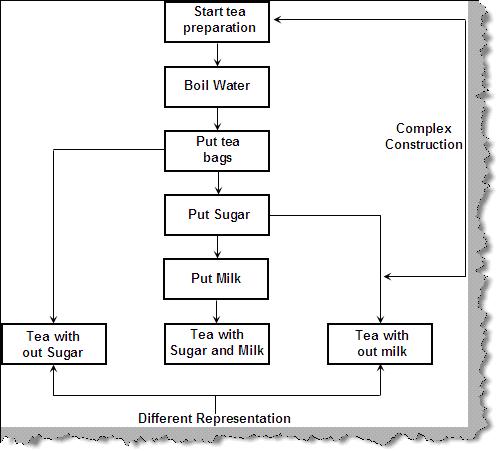
To understand what we mean by construction and representation lets take the example of the below 'Tea preparation' sequence.
You can see from the figure 'Tea preparation' from the same preparation steps we can get three representation of tea's (i.e. Tea with out sugar, tea with sugar / milk and tea with out milk).

Figure 12. Tea preparation
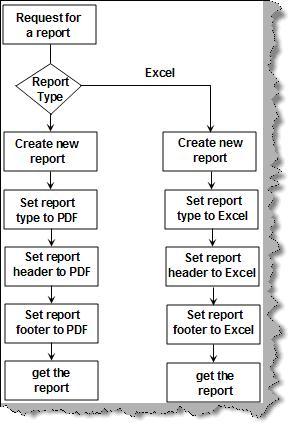
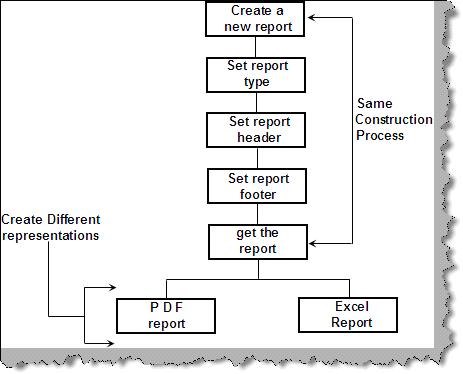
Now let's take a real time example in software world to see how builder can separate the complex creation and its representation. Consider we have application where we need the same report to be displayed in either 'PDF' or 'EXCEL' format. Figure 'Request a report' shows the series of steps to achieve the same. Depending on report type a new report is created, report type is set, headers and footers of the report are set and finally we get the report for display.

Figure 13. Request a report
Now let's take a different view of the problem as shown in figure 'Different View'. The same flow defined in 'Request a report' is now analyzed in representations and common construction. The construction process is same for both the types of reports but they result in different representations.

Figure 14. Different View
We will take the same report problem and try to solve the same using builder patterns. There are three main parts when you want to implement builder patterns.
Builder : Builder is responsible for defining the construction process for individual parts. Builder has those individual processes to initialize and configure the product.
Director : Director takes those individual processes from the builder and defines the sequence to build the product.
Product : Product is the final object which is produced from the builder and director coordination.
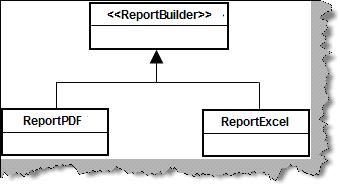
First let's have a look at the builder class hierarchy. We have a abstract class called as 'ReportBuilder' from which custom builders like 'ReportPDF' builder and 'ReportEXCEL' builder will be built.

Figure 15. Builder class hierarchy
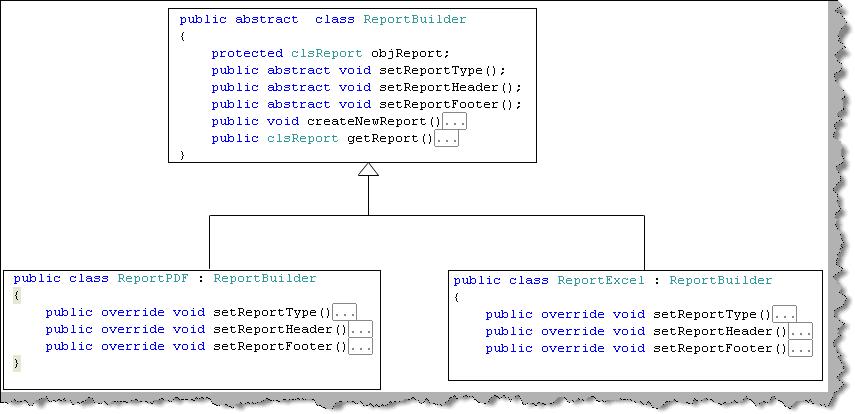
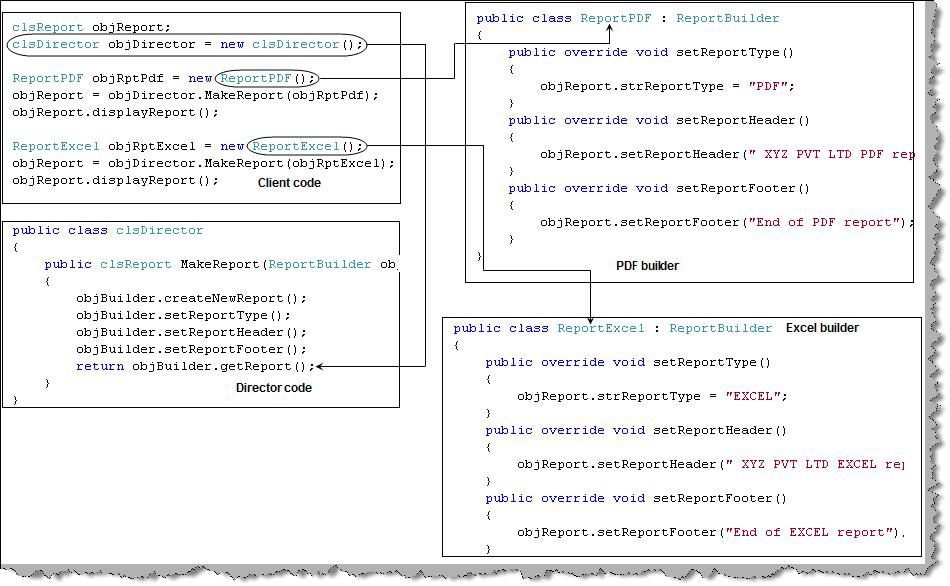
Figure 'Builder classes in actual code' shows the methods of the classes. To generate report we need to first Create a new report, set the report type (to EXCEL or PDF) , set report headers , set the report footers and finally get the report. We have defined two custom builders one for 'PDF' (ReportPDF) and other for 'EXCEL' (ReportExcel). These two custom builders define there own process according to the report type.

Figure 16. Builder classes in actual code
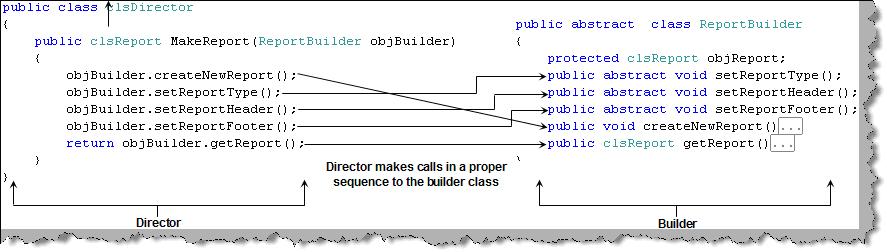
Now let's understand how director will work. Class 'clsDirector' takes the builder and calls the individual method process in a sequential manner. So director is like a driver who takes all the individual processes and calls them in sequential manner to generate the final product, which is the report in this case. Figure 'Director in action' shows how the method 'MakeReport' calls the individual process to generate the report product by PDF or EXCEL.

Figure 17. Director in action
The third component in the builder is the product which is nothing but the report class in this case.

Figure 18. The report class
Now let's take a top view of the builder project. Figure 'Client,builder,director and product' shows how they work to achieve the builder pattern. Client creates the object of the director class and passes the appropriate builder to initialize the product. Depending on the builder the product is initialized/created and finally sent to the client.

Figure 19. Client, builder, director and product
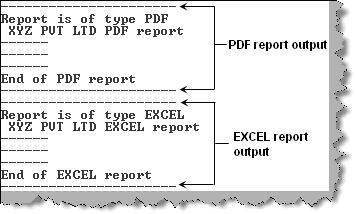
The output is something like this. We can see two report types displayed with their headers according to the builder.

Figure 20. Final output of builder

Friday, September 4, 2009

Abstract Factory Pattern

Source:-c-sharpcorner.com

Link :-http://www.csharpcorner.com/UploadFile/questpond/DP109212008014904AM/DP1.aspx

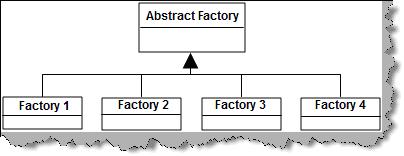
Abstract factory expands on the basic factory pattern. Abstract factory helps us to unite similar factory pattern classes in to one unified interface. So basically all the common factory patterns now inherit from a common abstract factory class which unifies them in a common class. All other things related to factory pattern remain same as discussed in the previous question.
A factory class helps us to centralize the creation of classes and types. Abstract factory helps us to bring uniformity between related factory patterns which leads more simplified interface for the client.


Figure 5. Abstract factory unifies related factory patterns
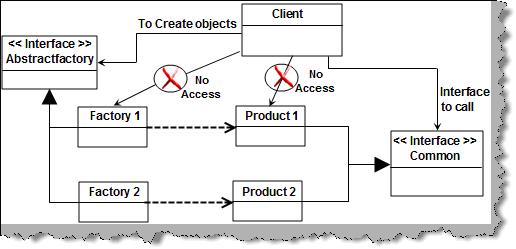
Now that we know the basic lets try to understand the details of how abstract factory patterns are actually implemented. As said previously we have the factory pattern classes (factory1 and factory2) tied up to a common abstract factory (AbstractFactory Interface) via inheritance. Factory classes stand on the top of concrete classes which are again derived from common interface. For instance in figure 'Implementation of abstract factory' both the concrete classes 'product1' and 'product2' inherits from one interface i.e. 'common'. The client who wants to use the concrete class will only interact with the abstract factory and the common interface from which the concrete classes inherit.


Figure 6. Implementation of abstract factory
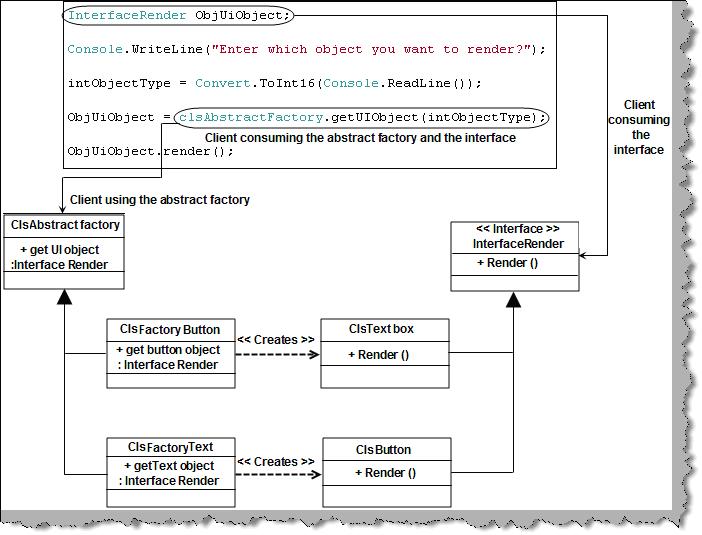
Now let's have a look at how we can practically implement abstract factory in actual code. We have scenario where we have UI creational activities for textboxes and buttons through their own centralized factory classes 'ClsFactoryButton' and 'ClsFactoryText'. Both these classes inherit from common interface 'InterfaceRender'. Both the factories 'ClsFactoryButton' and 'ClsFactoryText' inherits from the common factory 'ClsAbstractFactory'. Figure 'Example for AbstractFactory' shows how these classes are arranged and the client code for the same. One of the important points to be noted about the client code is that it does not interact with the concrete classes. For object creation it uses the abstract factory ( ClsAbstractFactory ) and for calling the concrete class implementation it calls the methods via the interface 'InterfaceRender'. So the 'ClsAbstractFactory' class provides a common interface for both factories 'ClsFactoryButton' and 'ClsFactoryText'.


Figure 7. Example for abstract factory
Note: We have provided a code sample in C# in the 'AbstractFactory' folder. People who are from different technology can compare easily the implementation in their own language.
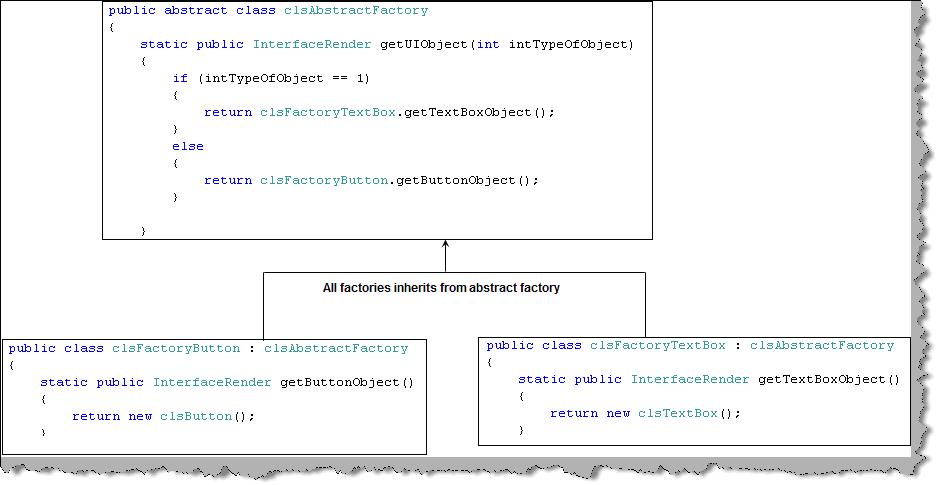
We will just run through the sample code for abstract factory. Below code snippet 'Abstract factory and factory code snippet' shows how the factory pattern classes inherit from abstract factory.


Figure 8. Abstract factory and factory code snippet
Figure 'Common Interface for concrete classes' how the concrete classes inherits from a common interface 'InterFaceRender' which enforces the method 'render' in all the concrete classes.

Figure 9. Common interface for concrete classes

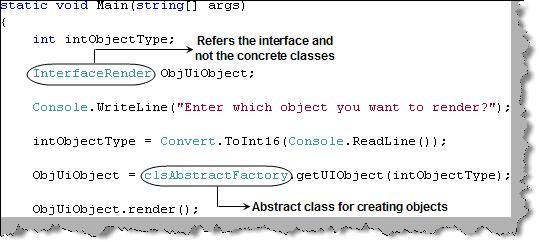
The final thing is the client code which uses the interface 'InterfaceRender' and abstract factory 'ClsAbstractFactory' to call and create the objects. One of the important points about the code is that it is completely isolated from the concrete classes. Due to this any changes in concrete classes like adding and removing concrete classes does not need client level changes.


Figure 10. Client, interface and abstract factory

Thursday, September 3, 2009

Factory Pattern

Source :- C-SharpCorner

Link:-http://www.csharpcorner.com/UploadFile/questpond/DP109212008014904AM/DP1.aspx

Factory pattern is one of the types of creational patterns. You can make out from the name factory itself it's meant to construct and create something. In software architecture world factory pattern is meant to centralize creation of objects. Below is a code snippet of a client which has different types of invoices. These invoices are created depending on the invoice type specified by the client. There are two issues with the code below :
First we have lots of 'new' keyword scattered in the client. In other ways the client is loaded with lot of object creational activities which can make the client logic very complicated.
Second issue is that the client needs to be aware of all types of invoices. So if we are adding one more invoice class type called as 'InvoiceWithFooter' we need to reference the new class in the client and recompile the client also.

Figure 1. Different types of invoice
Taking these issues as our base we will now look in to how factory pattern can help us solve the same. Below figure 'Factory Pattern' shows two concrete classes 'ClsInvoiceWithHeader' and 'ClsInvoiceWithOutHeader'.
The first issue was that these classes are in direct contact with client which leads to lot of 'new' keyword scattered in the client code. This is removed by introducing a new class 'ClsFactoryInvoice' which does all the creation of objects.
The second issue was that the client code is aware of both the concrete classes i.e. 'ClsInvoiceWithHeader' and 'ClsInvoiceWithOutHeader'. This leads to recompiling of the client code when we add new invoice types. For instance if we add 'ClsInvoiceWithFooter' client code needs to be changed and recompiled accordingly. To remove this issue we have introduced a common interface 'IInvoice'. Both the concrete classes 'ClsInvoiceWithHeader' and 'ClsInvoiceWithOutHeader' inherit and implement the 'IInvoice' interface.
The client references only the 'IInvoice' interface which results in zero connection between client and the concrete classes ( 'ClsInvoiceWithHeader' and 'ClsInvoiceWithOutHeader'). So now if we add new concrete invoice class we do not need to change any thing at the client side.
In one line the creation of objects is taken care by 'ClsFactoryInvoice' and the client disconnection from the concrete classes is taken care by 'IInvoice' interface.

Figure 2. Factory pattern
Below are the code snippets of how actually factory pattern can be implemented in C#. In order to avoid recompiling the client we have introduced the invoice interface 'IInvoice'. Both the concrete classes 'ClsInvoiceWithOutHeaders' and 'ClsInvoiceWithHeader' inherit and implement the 'IInvoice' interface.

Figure 3. Interface and concrete classes
We have also introduced an extra class 'ClsFactoryInvoice' with a function 'getInvoice()' which will generate objects of both the invoices depending on 'intInvoiceType' value. In short we have centralized the logic of object creation in the 'ClsFactoryInvoice'. The client calls the 'getInvoice' function to generate the invoice classes. One of the most important points to be noted is that client only refers to 'IInvoice' type and the factory class 'ClsFactoryInvoice' also gives the same type of reference. This helps the client to be complete detached from the concrete classes, so now when we add new classes and invoice types we do not need to recompile the client.

Figure 4. Factory class which generates objects
Note : The above example is given in C# . Even if you are from some other technology you can still map the concept accordingly. You can get source code from the CD in 'FactoryPattern' folder.

Tuesday, March 17, 2009

Factory Pattern

                                                                Factory Pattern


The factory design pattern is very simple. Several other patterns, like the abstract factory pattern, build off of it though, so it is a common base pattern. You use this pattern when one or more of the following are true:

1. A class can't anticipate the class of object it must create.
2. A class wants its subclasses to specify the objects it creates.
3. Classes delegate responsibility to one of several helper subclasses, and you want to localize the knowledge of which helper subclass is the delegate.[GOF108]

The class is easy to implement and consists of an identifier, either named constants or an enum and a switch statement. For our example we will be creating dog objects. As with any good OO design we start with an interface for our related objects.

The IDog interface


Code:

    public interface IDog
    {
        void Bark();
        void Scratch();
    }


We just define a couple of simple methods for our dogs to do.

    Now for the two actual concrete dog classes. We define a bulldog and poodle class:

Code:

    public class CPoodle : IDog
    {
        public CPoodle()
        {
            Console.WriteLine("Creating Poodle");
        }
        public void Bark()
        {
            Console.WriteLine("Yip Yip");
        }
        public void Scratch()
        {
            Console.WriteLine("Scratch Scratch");
        }
    }
    public class CBullDog : IDog
    {
        public CBullDog()
        {
            Console.WriteLine("Creating Bulldog");
        }
        public void Bark()
        {
            Console.WriteLine("Wooof Wooof");
        }
        public void Scratch()
        {
            Console.WriteLine("Scratch Slobber Scratch");
        }
    }

    Now for our factory class. It’s static and contains one method to return the correct dog.


Code:

    public class CDogFactory
    {
        public enum DogType
        {
            Poodle,Bulldog
        }
        static CDogFactory()
        {
        }
        public static IDog CreateDog(DogType TypeOfDog)
        {
            switch (TypeOfDog)
            {
                case DogType.Bulldog:
                    return new CBullDog();
                case DogType.Poodle:
                    return new CPoodle();
                default:
                    throw new ArgumentException("Invalid Dog Type!");
            }
        }
    }

We make the class static so we don’t need an instance of the class.

    To test the class, I have created a simple function. Our test function just return the dogs and uses them. In a more real world app, the type of dog would have been determined by the user or through program logic.


Code:
        IDog dog1;
        IDog dog2;

        dog1 = CDogFactory.CreateDog(CDogFactory.DogType.Bulldog);
        dog2 = CDogFactory.CreateDog(CDogFactory.DogType.Poodle);

        dog1.Bark();
        dog1.Scratch();

        dog2.Bark();
        dog2.Scratch();